3d Tree Mural

by zpnnAug 10, 2026decoration1914.1 KB
Schematic preview
View in 3D
Copyright issue?

Build at a Glance

Dimensions3 × 13 × 18
Footprint54 blocks
Total blocks394
Block types30
EditionJava
File size4.1 KB
DifficultyBeginner

Build Overview

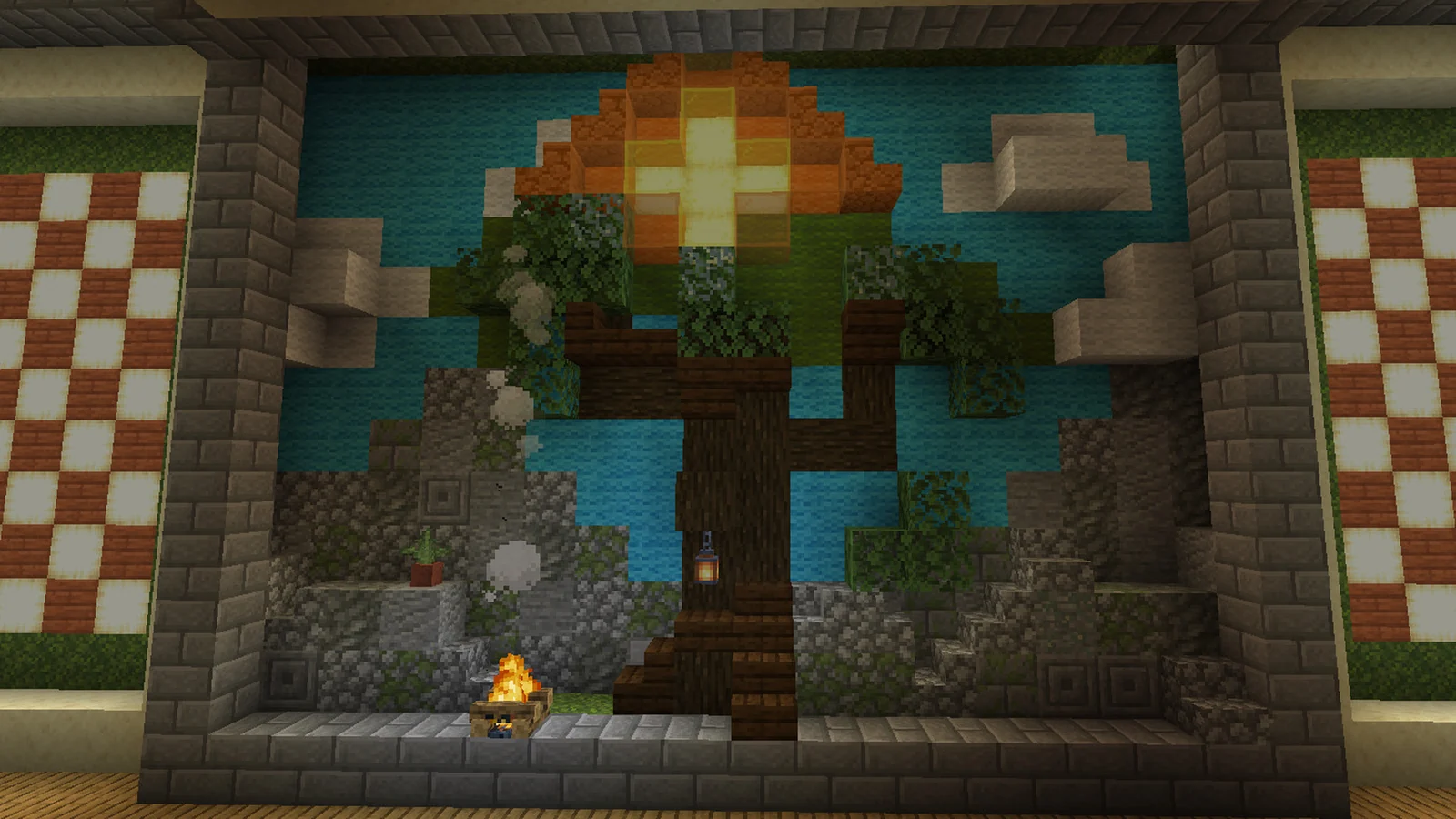
As displayed on Reddit, minus a couple of chops. So admittedly a bit weird clipping, but mostly because this is meant to be embedded into the wall and is not meant to be viewed directly from the sides or back.

You do NOT need the oak planks to make this, those are filler blocks on the bottom row behind as I prefer to 'fill in' stuff not being seen/looked at to prevent mobs getting stuck, which can unfortunately happen a lot in Cobblemon if you're not careful.

As this took a little while to build I'd really love it if you commented if you used this, but you don't have to. My builds are free. Alternatively you can talk about it online and maybe one day I'll find it and smile.

No mods required for this one though again, for transparency's sake, this was built on cobblemon.

This decoration build measures 3 × 13 × 18 and uses 394 blocks across 30 different block types, mostly light blue wool, stone bricks, tuff.

It is made for Minecraft Java Edition.

Blocks You'll Need

394 blocks total
Light Blue Wool82
Stone Bricks42
Tuff24
White Wool24
Dark Oak Log23
Green Wool21
Oak Planks20
Cobblestone18
Oak Leaves18
Andesite15
Moss Block13
Mossy Cobblestone12
Cobblestone Stairs9
Chiseled Stone Bricks8
Orange Stained Glass7

Frequently Asked Questions

What Minecraft version is 3d Tree Mural for?
3d Tree Mural works on Java Edition. No specific version is listed, so it should load on most recent versions.
Do I need any mods to build 3d Tree Mural?
No mods are required. You only need Litematica (or another schematic mod) to view and place the build in survival or creative.
How many blocks does 3d Tree Mural use?
3d Tree Mural uses 394 blocks across 30 block types, and measures 3 × 13 × 18. Use the materials list above to gather everything first.
How do I import 3d Tree Mural into Minecraft?
Download the file above, then: in Litematica (Java), put the .litematic in your .minecraft/schematics folder, open the Litematica menu in-game, load the schematic, and use the placement tools to build it block by block. In WorldEdit (Java), drop the .schem into your WorldEdit schematics folder and run //schem load then //paste. On Bedrock, use a structure-block or add-on workflow that imports .nbt structures.
Is 3d Tree Mural free to download?
Yes. Every schematic on MineSchematic is free to download in .litematic, .schem and .nbt formats, with no account required.

More from zpnn

View profile →

Comments (0)

Loading comments...